
Online Bill Payment & Instructions
Stockton East Water District will only accept payments for District Invoices.
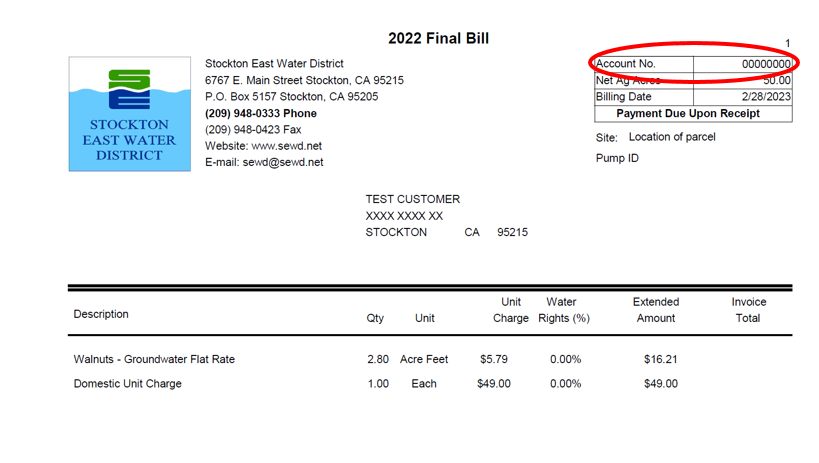
View a Sample Stockton East Water District Bill- If you are a City of Stockton Water Customer, please make your payment to the City.
- If you are a Cal Water Customer, please make your payment to Cal Water.
Third-Party Disclaimer:
Stockton East Water District now offers an online bill payment option as described below. The District accepts VISA, Mastercard, AMEX, Discover and debit cards. This Online Bill Pay is a secure service provided by AllPaid, a third party payment resource contracted by Stockton East Water District.
AllPaid, a third party payment resource contracted by Stockton East Water District, collects a convenience fee for using the online bill payment option. The convenience fee will appear as a separate transaction from the payment made to Stockton East Water District.
The convenience fee is automatically calculated once a payment amount has been entered.
- All Payment Types: 2.50% of payment amount, $1.00 min
Step-by-Step Online Payment Instructions:
- Click on the “Pay My Bill Online” link (you will be redirected to a secure third party online payment portal).
- Enter your information into the Payment Information section
- Please be sure to enter your Account Number (Account Number must be 8 digits).
- Your Account Number can be found at the top-right side of your invoice (example invoice shown below).
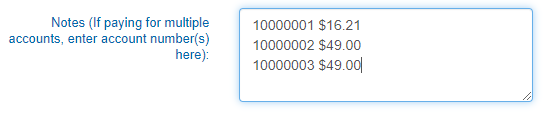
- If you are paying for multiple accounts, please enter each account number and amount due for each account in the Notes box (example shown below).
- Enter the total amount to be paid in the Payment Amount section
- If payment is past due, please add the 5% penalty in the Penalty Amount line. Please refer to the bill for the due date.
- Enter your information in the Billing Information section. Click Continue.
- Please review the information you have entered. After reviewing, please click on the checkbox to accept the Terms and Conditions.
- To receive an email confirmation for the transaction, you can click on the additional checkbox and enter your email address in the line provided.
- Click Process Payment.
- Once the payment has been processed, you will be directed to the payment confirmation page. You may print this page for your records.
- Payments may take up to twenty-four (24) hours, or one business day, to process.